NatJack: NAT Table Attacks Explained, Who Is Affected, and What Measures Are Needed
NatJack is a new class of attacks against NAT devices: An attacker behind the same router, firewall, or Docker bridge can hijack other TCP connections, intercept DNS responses, or disable NAT. How the attack works, which products are affected, when action is needed, and which measures are effective.
NatJack is a class of attacks against devices that perform Network Address Translation (NAT): routers, firewalls, hypervisor networks, container bridges, and cloud NAT gateways. An attacker located behind the same NAT device as their victim manipulates its NAT table so that responses from the internet no longer reach the victim but instead arrive at the attacker. This makes it possible to hijack existing TCP connections, intercept and forge DNS responses, or block the NAT device for all other users. The research was published by Malcolm Stagg (SODIUM-24, LLC) on August 6, 2026, at Black Hat USA, coordinated through CERT/CC (VU#268870) with 13 vendors. In 23 tested products, 95 individual findings were reported; according to the white paper, every tested device with NAT was vulnerable to at least part of the attacks.
In short: No action is needed for a home network with only your own devices. Measures are necessary where external or untrusted users and workloads share the same NAT device as your production systems: guest Wi-Fi on the corporate firewall, Docker and Kubernetes hosts with third-party images, test VMs in the NAT network of a Hyper-V host, and hosting and co-working environments. The most effective measure is encryption (TLS internally as well, secured DNS); the second most effective is separating trust zones onto separate NAT devices.
Support with your assessment
If you would like to check whether your firewall, container, or hypervisor environment is affected, please use the contact form on adeptio.ch.
What a NAT Table Does
Behind a NAT device, devices have private addresses from RFC 1918, such as 10.0.10.21. When a device establishes an outbound connection, the NAT device replaces the source address and port with its external address and an external port, and stores the mapping in the NAT table. When the server response returns, the device looks up which internal device it belongs to in the table. On Linux, Netfilter handles this through its connection tracking conntrack; most commercial routers, OpenWRT, Docker, and Kubernetes use this code.
Originally, NAT was a transitional solution for IPv4 address scarcity, not a security boundary. In practice, however, it has become one: At Layer 2, VLANs, port isolation, Dynamic ARP Inspection, and vSwitch isolation cleanly separate devices from one another, and ARP spoofing is now rarely possible in well-maintained networks. At Layer 3/4, however, the separate networks often converge again on the same NAT device. This is precisely where NatJack comes in.
How the Attack Works
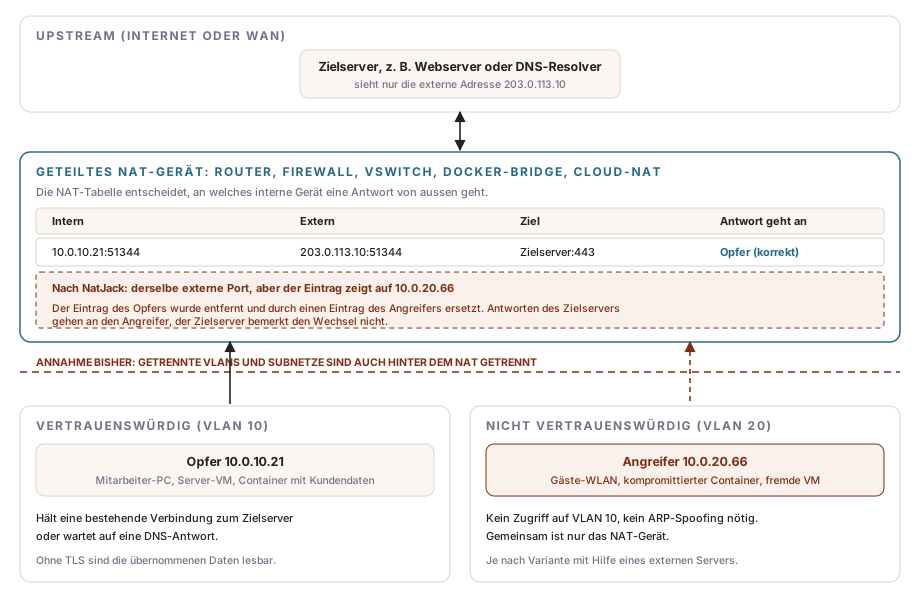
All NatJack variants follow the same pattern: The attacker causes the NAT device to remove the victim’s table entry, then immediately creates their own entry with the same external parameters. The NAT device then forwards the server’s next response to the attacker. Neither the server nor the victim receives an error message.
This is made possible by behaviors designed for a cooperative network, where they make sense:
- Loose mode: By default, Netfilter also adds TCP connections to the table when it has not seen their handshake. This is intended to preserve connections after a router restart or path change, but it also allows entries to be created without a valid connection setup.
- Lenient validation of reset packets: The NAT device checks sequence numbers less strictly than the endpoints themselves so it does not discard valid packets. Packets that an endpoint would ignore can still be treated by the NAT device as the end of a connection.
- Port Preservation and Endpoint-Independent Mapping: Where possible, Netfilter uses the internal port as the external port and reuses an assigned mapping for all destinations. Behavior during port conflicts can reveal which ports other devices are currently using.
- Finite table: If the table is full, Netfilter randomly discards entries that have not yet been confirmed, such as pending DNS requests. Confirmed connections remain in place for up to five days.
For most variants, the attacker must be able to send packets with a spoofed source address. If the attacker and victim are in the same subnet, a device or container with raw socket privileges (NET_RAW) is sufficient. The upstream variant also works across subnet and VLAN boundaries; for this, the attacker additionally needs their own internet server that can send packets with a spoofed source address. The white paper describes the packet sequences and proof-of-concept code; the announced Technical Report with a test framework has not yet been published.
The Five Vulnerabilities at a Glance
The white paper describes five vulnerabilities. The ratings are typical values; they vary by product.
| Vulnerability | Impact | CVSS 3.1 (typical) |
|---|---|---|
| Denial of Service | The attacker fills the NAT table with confirmed entries. No other device can establish new connections, for up to five days with Netfilter or until restart. | 7.4 (High) |
| Port and IP disclosure | The attacker detects that another device is connected to a specific server and determines its port and internal address. This primarily serves as a preliminary step for the other attacks. | 4.7 (Medium) |
| DNS hijacking over UDP | With a certain probability, the attacker intercepts a DNS response for another device and sends a forged response, for example with the address of their own server. | 10.0 (Critical) |
| TCP hijacking (downstream) | The attacker hijacks an existing TCP connection of a device in the same subnet, reads the server’s responses, and sends data in the victim’s name. | 9.6 (Critical) |
| TCP hijacking (upstream) | As above, but across subnet and VLAN boundaries with the help of an external attacker-controlled server. | 10.0 (Critical) |
All protocols without strong encryption are affected: HTTP, DNS over UDP, Telnet-based administration protocols, and mail protocols such as SMTP and IMAP when run without TLS. With a TLS connection, the attacker can interrupt the connection, but cannot obtain readable data or inject anything. The white paper also notes that attack packets can be sent with a reduced TTL so they reach the NAT device but do not proceed further into the network. This makes detection more difficult.
Compared with ARP spoofing, NatJack has a similar effect but bypasses established Layer 2 protections. Earlier work by Yang et al. (CVE-2023-30305 through CVE-2023-30314) demonstrated TCP hijacking through NAT tables in Wi-Fi routers with insecure nonstandard options; NatJack works in the default configuration.
Who Is Affected
According to the white paper, virtually all Linux-based routers are vulnerable, as are systems with entirely different codebases. The following overview summarizes the status of the patch matrix on natjack.io (last updated August 19, 2026).
| Area | Products | Status |
|---|---|---|
| Linux / Netfilter | Linux kernel, OpenWRT, DD-WRT, almost all Linux-based routers | Partial fix with CVE-2026-63913 starting with Linux 7.1; increases the effort, but does not provide complete protection. OpenWRT and DD-WRT need the Netfilter changes. |
| BSD | FreeBSD pf, OpenBSD pf | Greatly mitigated in FreeBSD from 15.0.0 onward by a change from OpenBSD; older versions are affected. OpenBSD has been significantly better protected since 2016. |
| Windows | Windows NAT (Hyper-V vSwitch with NAT) | CVE-2026-56181 (July 2026) and CVE-2026-56179 (August 2026), both rated moderate. The mitigation for CVE-2026-56179 is disabled by default and enabled through the Registry. Windows Internet Connection Sharing is under review. |
| Network devices | Cisco Firepower and Meraki, NETGEAR Nighthawk, Google Nest WiFi Pro, SpaceX Starlink, Amazon eero | Depending on the vendor, partial protection, configuration recommendations, or no update. eero has published its own advisory. |
| Hotspots | iOS Personal Hotspot, macOS Internet Sharing, Android hotspot | affected |
| Virtualization and containers | Hyper-V, KVM/QEMU, Apple Virtualization Framework, Docker (Bridge), FreeBSD Jails, GKE, MicroK8s with Calico or Flannel, Azure AKS | affected; protection mainly through configuration (see below) |
| Cloud | AWS NAT Gateway and NLB, Google Cloud NAT, Cloud Run, Azure Firewall, Azure NAT Gateway, Azure Functions | AWS has hardened its service-side implementation; customers do not need to do anything. AWS Lambda is protected due to the lack of NET_RAW. Check natjack.io for the status of the remaining services. |
Are Measures Necessary?
What matters is who is behind the same NAT device; whether your router model appears on the list is secondary. Every variant requires the attacker to already control a device, VM, or container behind the NAT. Where these are only your own trusted devices, an attacker with that access would have easier ways anyway. Accordingly, the white paper states that most home users are not seriously affected, whereas the impact is considerably more severe for companies and service providers.
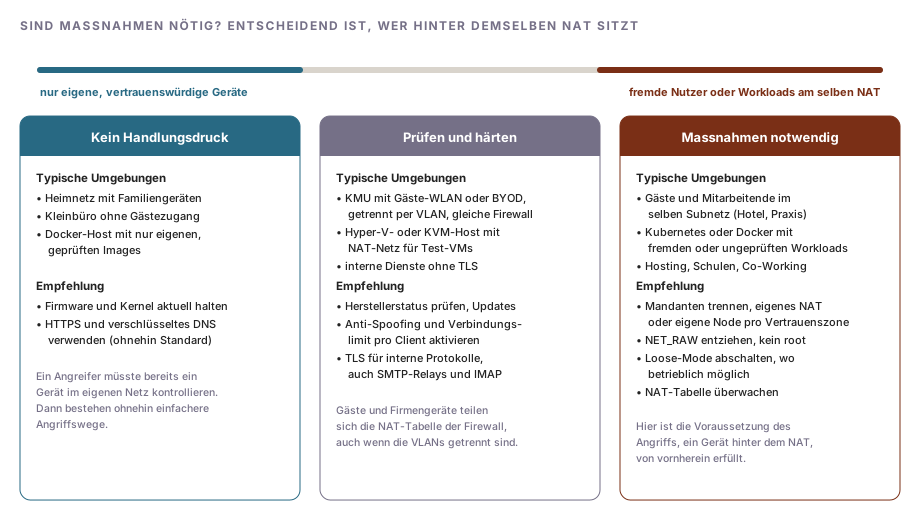
In Swiss SMBs, the middle level is the most common case: Guest Wi-Fi is separated by VLAN, but uses the same firewall to access the internet as the corporate network. VLAN separation prevents ARP spoofing and direct access, but both networks still share the NAT table. For the downstream variant, the attacker would need to be in the same subnet as their victim; the upstream variant works across the VLAN boundary, but is more complex and requires an external server. Measures are clearly necessary where external users are on the same subnet (hotel, medical practice, or school Wi-Fi without client isolation) and on container and Kubernetes hosts where workloads with different trust levels run. A compromised npm or PyPI package in a container is sufficient as a starting point there.
For mail services, it is worth taking a targeted look at internal connections without TLS: scanners, line-of-business applications, and monitoring systems that submit unencrypted over port 25 to an internal relay, as well as IMAP without TLS. The article Sending mail through a relay: Checking TLS and authentication explains how to check TLS and authentication on the relay.
Measures
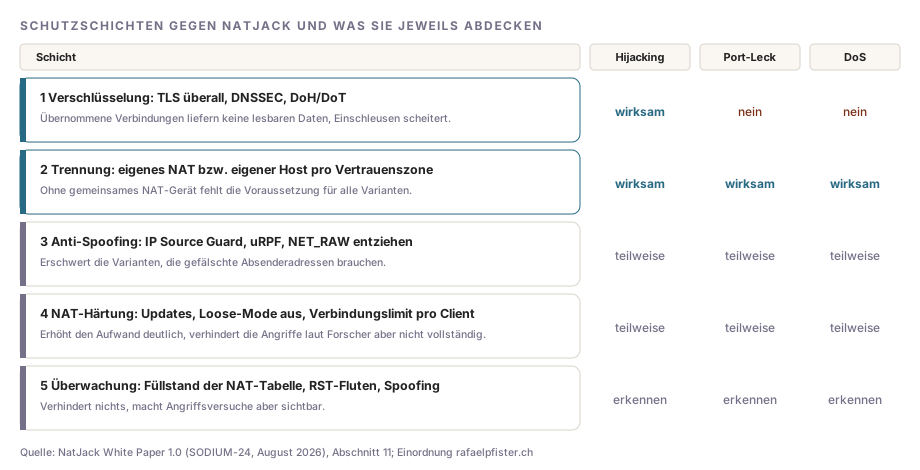
The white paper’s recommendations can be organized into five layers. They differ in which vulnerabilities they help address.
Encryption
TLS on all connections, including between internal systems, makes hijacked TCP connections worthless: The attacker can terminate them, but cannot eavesdrop on or inject data. For DNS, the white paper recommends DNSSEC against forged responses as well as DNS over HTTPS or DNS over TLS against interception. Encryption does not help against port disclosure or Denial of Service.
Separation of Trust Zones
Run untrusted devices and workloads in separate subnets and VLANs, with L3/L4 ACLs that prevent any access to trusted hosts. A separate NAT device or separate external address per trust zone is more effective, because without a shared NAT table, the basis for all variants is absent. In the cloud, this means: Do not run trusted and external workloads behind the same NAT Gateway, and use dedicated rather than shared IP addresses for serverless services. In Kubernetes, untrusted pods run on separate nodes.
Anti-Spoofing
Enable IP Source Guard or an equivalent function on the switch or access point, and uRPF (Reverse Path Filtering) on the router, so clients can send only with their own address. In containers, removing the NET_RAW capability prevents a compromised process from generating spoofed packets. Docker assigns this capability by default.
docker run --cap-drop=NET_RAW --user 1000:1000 example/app:1.4ping requires NET_RAW in some images; on current kernels, it usually works without it via unprivileged ICMP sockets. In Kubernetes, the container’s securityContext handles this:
securityContext:
  runAsNonRoot: true
  allowPrivilegeEscalation: false
  capabilities:
    drop:
- NET_RAWThe Pod Security Standard restricted requires containers to drop all capabilities (drop: [ALL]), thereby covering NET_RAW.
NAT Hardening
Install the available updates: kernel or firmware with the Netfilter fix, the July and August 2026 Windows updates on Hyper-V hosts with a NAT network, and FreeBSD 15.0.0 or later. Whether your distribution’s kernel contains the fix for CVE-2026-63913 is listed in the kernel package changelog.
On Linux routers and container hosts, loose mode can also be disabled. Netfilter will then add only TCP connections with a complete handshake to the table.
sysctl net.netfilter.nf_conntrack_tcp_loose
sudo sysctl -w net.netfilter.nf_conntrack_tcp_loose=0
echo "net.netfilter.nf_conntrack_tcp_loose = 0" | sudo tee /etc/sysctl.d/90-natjack.confLoose mode exists for a reason: After a router restart or a failover in a cluster with conntrackd, existing connections fail without it. Check this before making the change, especially on highly available firewalls. The white paper explicitly notes that several measures balance security, availability, and protocol compatibility.
Additional settings, where your product offers them:
- Connection limit per client: The white paper recommends a limit of approximately 10,000 simultaneous connections per client. On pf-based firewalls such as OPNsense and pfSense, the setting is in the advanced options of the firewall rule (pf:
max-src-states). - Disable Port Preservation and Endpoint-Independent Mapping: Makes port discovery more difficult. In pf, a NAT rule without
static-portrandomly replaces the source port. Note that some VoIP and peer-to-peer applications rely on fixed mappings. - ISN randomization: In pf, use
modulate stateinstead ofkeep state. You should avoid rules withflags anybecause they allow connections without a valid handshake.
Monitoring
The white paper lists several signs of attack attempts: a full or nearly full NAT table, packet floods from a client over a broad range of source ports, the same IP address on two MAC addresses or one MAC address with multiple IP addresses, floods of RST packets with changing sequence numbers, sequence numbers far outside the TCP window, and packets with conspicuously low TTL. On Linux, the table utilization can be viewed by comparing two values:
cat /proc/sys/net/netfilter/nf_conntrack_count /proc/sys/net/netfilter/nf_conntrack_maxIf the first value remains close to the second, this warrants investigation regardless of NatJack. Many firewalls display the same metric as “State Table” or “Sessions” in the dashboard and can alert at a threshold.
Assessment
NatJack exploits assumptions that have been embedded in NAT implementations for decades, rather than a single programming flaw. This is why there is no patch that completely eliminates the attack class: Linux and Windows have increased the effort required, AWS has improved its service-side implementation, and many devices remain without an update. Sustainable measures lie in your own architecture: encrypted protocols even on the internal network, and no shared NAT device for systems you trust to different degrees. Those who have implemented both can address NatJack with their regular patch cycle.

Comments
Comments are loaded from GitHub / Giscus.