Understanding Mail Routing Between TotemoMail and Exchange Online
How TotemoMail stores and processes messages, how the underlying Apache James switches between processors, and what matters for a secure mail loop with Exchange Online.
In a mail loop between Exchange Online and TotemoMail, each system has a clearly defined role. Exchange Online provides the mailboxes. TotemoMail, now Kiteworks Email Protection Gateway, handles encryption, signatures, policies, and special routing rules.
To achieve reliable mail flow, configuring two SMTP connectors is not enough. For troubleshooting, it must also be clear what happens within the gateway after a message has been accepted: Where is it stored? Which rule runs next? And why can a message wait in a queue even though the SMTP dialog has already completed successfully?
This article therefore explains the processing model of Apache James, which TotemoMail is built on. The specific routing configuration depends on the environment; however, the processors, matchers, mailets, and repositories described here form the technical foundation of every installation.
One important security rule applies regardless of the details: If TotemoMail is the upstream gateway, Exchange Online must accept Internet mail only from that gateway. This requires a restrictive partner connector. An MX record alone does not block the direct delivery path. The article An MX Record Is Not a Firewall explains how this side entrance is created and how to close it.
From SMTP Intake to Processing
The processing logic of Apache James consists of four components:
- Matchers check conditions and determine which recipients a rule applies to.
- Mailets perform the actual action, such as modifying headers, encrypting, delivering, or ending further processing.
- Processors combine matchers and mailets into ordered processing steps.
- Mail repositories store messages during processing or after an error.
This separation is crucial for analysis: The repository answers the question of where a message is located. The processor determines how it is processed further.
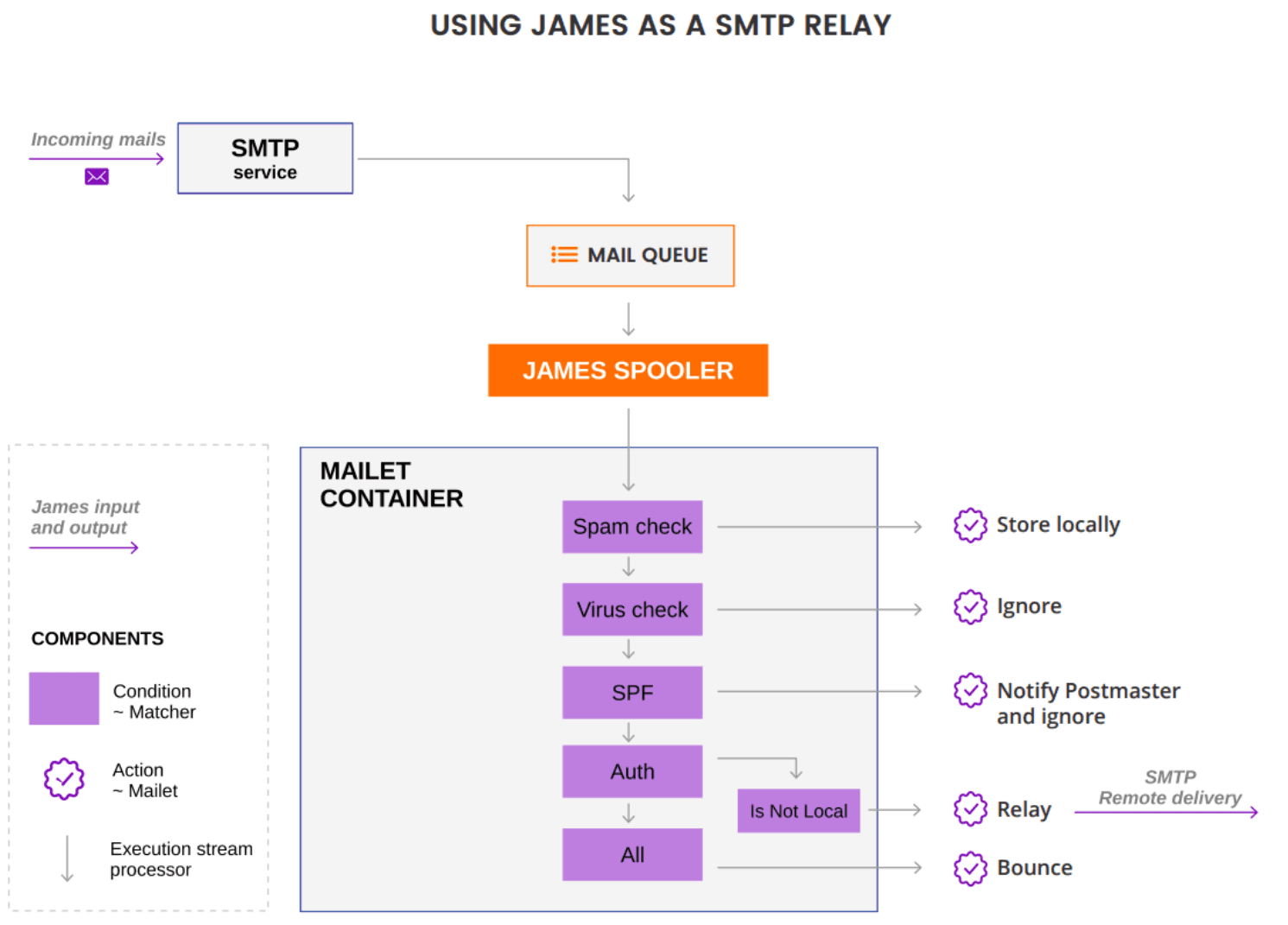
The SMTP server accepts the connection and reads the message through the end of the DATA section. James then creates a MailImpl object. It contains the MIME content as MimeMessage, along with the information required for processing: sender, recipients, status, and other attributes.
With a file-based repository, James stores this information separately:
FileStreamStorecontains the complete RFC 822/MIME message as a byte stream.FileObjectStorecontains the serializedMailImplobject with status and metadata.
A message may therefore already have been fully accepted and stored even though its business processing is still pending.
Repositories and Queues Under /var/mail
The individual repositories appear as directories in the file system. Under normal operation, a message remains there only very briefly. If a queue backs up, this usually indicates a faulty rule, an unreachable destination, or an unavailable backend service.
In addition to the standard queues, the following example also includes optional directories for a HIN connection. HIN provides the secure communication environment for Swiss healthcare.
If you need assistance connecting HIN Mailgateway or migrating to the new HIN Stargate solution, you can find the relevant experts at adeptio.
adeptio is an official partner of Health Info Net AG and therefore also has direct contacts at the vendor.
➜ Book an appointment today.
Root-Folder:
~/mailer/apps/james/var/mail

├── spool/
│   → Eingehende Mails (initiale Queue, noch nicht verarbeitet)
│
├── incoming/
│   → Mails, die als intern zuzustellen erkannt wurden (Standardfolder)
│
├── incomingHIN/
│   → Eingehende Mails für HIN-Netzwerk (Optional)
│
├── outgoing/
│   → Normale ausgehende Mails (Standardfolder)
│
├── outgoingHIN/
│   → Ausgehende Mails über HIN-Netzwerk (Optional)
│
├── outgoingNotifications/
│   → System- oder Zertifikatsbenachrichtigungen
│
├── error/
│   → Fehlgeschlagene Mails (z. B. Policy, Encryption, Routing)
│
├── DBUnavailable/
│   → Mails, die wegen Backend-/DB-Problemen nicht verarbeitet werden konnten
How a Message Is Stored in the File System
Each stored message consists of two files.
FileStreamStore: Message Content
The *.FileStreamStore file contains the complete RFC 822/MIME message. With cat, the headers and body can be read:
From:
To:
Subject:
...
Body
The underlying message format is described in RFC 822.
FileObjectStore: Status and Metadata
The *.FileObjectStore file is a serialized Java object of type org.apache.james.core.MailImpl. Its fields include:
attributes: HashMap
errorMessage: String
lastUpdated: Date
message: MimeMessage
name: String
state: String
recipients: Collection
remoteAddr
remoteHost
sender
The API documentation for MailImpl describes the object model in detail.
Status Selects the Next Processor
The directory structure shows only the repository. The actual processing state is stored in the state field of the FileObjectStore. Its value refers to the name attribute of a processor.
After each mailet, the SpoolManager checks this status:
- If the status remains unchanged, the next matcher-mailet pair in the same processor follows.
- If a mailet changes the status, James ends the current processor and jumps to the processor with the same name.
- The special
ghoststatus ends processing completely.
The mandatory root and error processors have fixed roles. New messages start in root; internal errors and mailets configured accordingly redirect to error. However, the order of the <processor> elements in the XML file does not determine the execution order.
Processor Structure in totemomail_config.xml
Before making any changes, export and back up the current totemomail_config.xml:
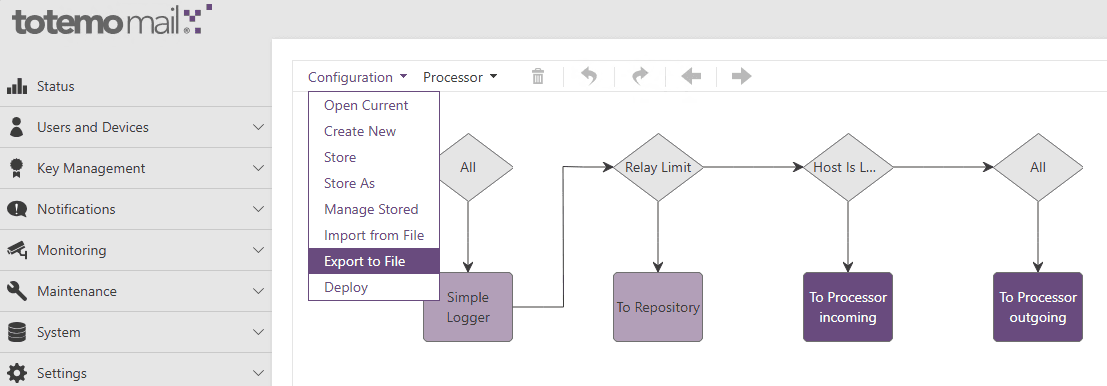
The various processors and the mailets they contain can be found in totemomail_config.xml. Here is another real-world example:
<?xml version="1.0" encoding="UTF-8"?>
<spoolmanager>
    <multiparamformat>XML</multiparamformat>

    <processor name="addExtSender">
    <processor name="decrypt">
    <processor name="error">
    <processor name="externalDelivery">
    <processor name="externalDeliveryToHIN">
    <processor name="incoming">
    <processor name="internalDelivery">
    <processor name="internalDeliveryToHIN">
    <processor name="outgoing">
    <processor name="outgoingCheckRecipientCertificate">
    <processor name="outgoingProcessAutoGeneratedMessages">
    <processor name="outgoingProcessEncryptionTriggers">
    <processor name="outgoingProcessEncryptionTriggersRemoval">
    <processor name="outgoingProcessExceptionTriggers">
    <processor name="processIncoming">
    <processor name="processOutgoing">
    <processor name="processOutgoingCertificateExchange">
    <processor name="processOutgoingDomainEncryptionPGP">
    <processor name="processOutgoingDomainEncryptionSMIME">
    <processor name="processOutgoingNotifications">
    <processor name="root">

</spoolmanager>
Although root appears at the end of this excerpt, every new message starts there. The name is what matters, not its position in the document.
The root processor itself contains an ordered list of matcher-mailet pairs:
   <processor name="root">
      <mailet class="SimpleLogger" match="All">
         <log-message>totemomail: New Mail</log-message>
         <showSenderEmailAddress>true</showSenderEmailAddress>
         <showRecipientsEmailAddress>true</showRecipientsEmailAddress>
         <showSubject>false</showSubject>
      </mailet>
      <mailet class="ToRepository" match="RelayLimit?Limit=20">
         <repositoryPath>file://var/mail/error</repositoryPath>
         <passThrough>false</passThrough>
         <notifySender>false</notifySender>
         <takeSenderInfoFrom>SMTP</takeSenderInfoFrom>
      </mailet>
      <mailet class="ToProcessor" match="HostIsLocal?includeSubdomains=no">
         <processor>incoming</processor>
      </mailet>
      <mailet class="ToProcessor" match="All">
         <processor>outgoing</processor>
      </mailet>
   </processor>
The XML file configures the classes but does not implement them. SimpleLogger, for example, is a class provided by TotemoMail or Kiteworks whose source code is not publicly available in the appliance. However, the help in the admin GUI explains its parameters:
log-messagedefines the log text and is required.showSenderEmailAddressoptionally adds the sender address.showRecipientsEmailAddressadds the recipient addresses.showSubjectadds the subject.
The order within a processor is binding. A matcher can select no recipients, all recipients, or only a subset. For a subset, James splits the message: matching recipients pass through the mailet, while the others are processed separately. If a mailet then changes the status, processing immediately jumps to the specified processor; the remaining rules in the current processor are skipped.
This results in a reliable troubleshooting workflow:
- Identify the repository and the corresponding
FileStreamStoreandFileObjectStorefiles. - Determine the current
stateinFileObjectStore. - Find the processor with the same name in
totemomail_config.xml. - Check the matchers and mailets in their actual order.
- If the status changes, continue in the target processor.
This makes it possible to trace mail flow step by step without mistakenly reading the XML file from top to bottom as a linear program.

Comments
Comments are loaded from GitHub / Giscus.